Sunday, 20 November 2016

Data types

there are some of the data types used by the oracle :

1. :
Fixed length storage of string. The default length of the CHAR is 1 and maximum size of the CHAR is 254.

2. NCHAR :
3. VARCHAR2
4. NVARCHAR2
5. VARCHAR
6. NUMBER
7. DATE
8. LONG
10 TIMESTAMP
11 BFILE
12 BLOB
13 CLOB
14 NCLOB
15 INT

Wednesday, 18 May 2016

Normalization

Normalization :

 steps to get database design that allows for efficient access and storage of data.
they are mainly used to reduce the inconsistency and redundancy.

there are majorly :

First Normal Form
Second Normal Form
Third Normal Form
Fourth Normal Form
Fifth Normal Form


Collections


     1       It is a composite data type.
     2       Here composite data type is composed of one or more fields that is it consists of one or more than  one fields in it.
     3       A procedure is also a composite data type, here collection is also a composite data type.

Why to use Collections?.

 One of the reason for using the collections is “Performance Optimization”. The following are some of the Use cases for performance optimizations
   1       To select and collect the data in bulk.
   2       To insert, update and delete more than one rows (multiple rows).
   3       To return the bulk data in “Functions”.

Basic Terminology:

 Index value:

 it’s an integer, sometimes a String based on the type of collection.

Element:

Elements in the collections are always same data types. (Records, Strings, dates etc.)

Sparse and Dense:

 A Collection is said to be Sparse if there are no index values defined in between range of the index values. Example: if an element in collection is assigned with the index value 24 and another index value 30. So there are no elements in the collection with index values in between 24 and 30. This type of collections are called as Sparse Collection. Where the Dense Collections has the elements with the index values up to 30.

Method:

Methods in the collections may be “Functions” and “Procedures”. They are attached to the variable in the collection by dot (.) annotation. They are used to manipulate the contents or information of the collection.

Following are the list of Methods :
  EXISTS(n).
2    Count
3    Delete
4    First
5    Last
6    Trim
7    Prior(n)
8    Next(n)
9   Extend
1   Extend(n)
1   Extend(n1.n2)
   Trim(n)
1 Delete(n)

1Delete(n1,n2)

Types of Collections:

Each Collection type is with specific characteristics and used in different scenarios. There are three different types of Collections.
   1       Associated array (Index Based).
   2       Nested Tables.
   3       Varray.


Monday, 2 May 2016

Joins

Topic: JOINS

Description:  Used for joining or combining the records of the different tables.

Types: there are different types of JOINS:
    1. Inner Join
    2. Outer Join
         1. Left outer join
         2. Right outer join
         3. Left join
         4. Right Join
         5. Full outer join
    3. Natural Join
    4. Equi Join
 

Apart from these we have some set operators:
1. Union
2. Intersect

Wednesday, 13 April 2016

Drop

Drop:

Dropping the table means deleting the data of the table along with its definition(structure of the table).

The difference between the truncate and drop:
 Truncate : only deleting the content or  entire records  of the data.
  Drop : deleting the entire table along with its content or records.


 lets create a table:
 create table student(sid number primary key,firstname varchar2(50) not null,lastname varchar2(50) not null,email varchar2(50) not null unique);

now lets drop the table:
 drop table student;

the log will be:
drop table student succeeded.

now just see the description of the table by following query:

desc student;

the log will be:
ERROR: object STUDENT does not exist

now if we want to get the table back. fire the following query:

flashback table student to before drop;

the log will be:
flashback table succeeded.

now again see the description of the log:
Name                           Null     Type                                                                                                                                                                                        
------------------------------ -------- ---------------------------------------------------------------------------------------------------------------------------------------------------------------------------------------------
SID                            NOT NULL NUMBER                                                                                                                                                                                      
FIRSTNAME                      NOT NULL VARCHAR2(50)                                                                                                                                                                                
LASTNAME                       NOT NULL VARCHAR2(50)                                                                                                                                                                                
EMAIL                          NOT NULL VARCHAR2(50)


Flashback:

when the table is dropped along with its records , if we use flashback then the table along with the data is restored. but the triggers which are created on the table does not work. you have to create the trigger again.

we can use rename to with the flashback;

Example: flashback table student to before drop rename to student_new;

Conclusion:
 whenever a table is dropped the associated triggers are also dropped.


Trigger

Trigger : 

Triggers are fired when the following events occur.
    The following events are :
    1. insert,update,delete -- DML 
    2. create,alter,drop -- DDL
    3. Login,Logoff,shutdown of the database.

Why Triggers?

 Suppose when some one is inserting in the table where you are the owner. then you can know that some one is inserting the data in the table that you own. We can say its for handling the events and for Security.

The basic syntax of the trigger is:


CREATE [OR REPLACE] TRIGGER <TRIGGERNAME>
[BEFORE | AFTER ][INSERT|UPDATE|DELETE] ON <TABLENAME>
BEGIN
 <STATEMENTS LIKE DBMS OUTPUT>
END;
/


Note : here triggers are created once and executed when ever a event is fired on the table specified in the creation of the trigger.

we cannot call trigger in the procedure or function , since it is a event handler , it is dynamic, that is it is fired when the specific queries are fired. 

Conclusion :
 Triggers are stored in the database once it is compiled and fired whenever the event occurs.

Below is the example:
 1. Create a table:
    create table student(sid number primary key,firstname varchar2(50) not null,lastname varchar2(50) not null,email varchar2(50) not null unique);
2. set the server output on:
 set serveroutput on;
3. create trigger for insert
  create or replace trigger studentinserttrigger
before insert on student
for each row
begin
 dbms_output.put_line('you are inserting into the student table');
end;
/

when the trigger is compiled you will get the following log:
 TRIGGER STUDENTINSERTTRIGGER compiled.

4. now lets insert into the table:
 insert into student values(1,'raaj','saraff','raajsaraff@self.com')

5. the log on console will be:
   1 rows inserted
    you are inserting into the student table

here in the above example , trigger is fired when the record in inserted.

In the same way, triggers for update,delete are created.


Now lets write a update trigger for the student table.

 create or replace trigger studentupdatetrigger
after update on student
for each row
begin
 dbms_output.put_line('you are updating the student table');
end;
/
the log will be: 
TRIGGER STUDENTUPDATETRIGGER compiled

Now update the record that is inserted.

update student set email = 'raajsaraff@saraff.in' where sid = 1

the console log  will be :
1 rows updated
you are updating the student table .

Now lets create trigger on delete:

create or replace trigger studentdeletetrigger 
before delete on student
begin
 dbms_output.put_line('you are deleting from student');
end;
/

The log will be :
 TRIGGER STUDENTDELETETRIGGER compiled

now just delete the record :
 delete from student;
The log will be :
1 rows deleted
 you are deleting from student.


Dropping a trigger:

drop trigger studentinserttrigger

log will be:
drop trigger studentinserttrigger succeeded.


Monday, 11 April 2016

Session Control Statements

Session Control Statements are not supported by the PL/SQL. They are basic SQL Commands.
ALTER SESSION
SET ROLE

TCS

Transaction Control Statements:

These statements manages the changes or modifications that are made by the DML statements
Following are the Commands used for Transaction Control Statement.
1. COMMIT
2. ROLLBACK
3. SAVEPOINT
4. SET TRANSACTION

DML

Data Manipulation Language:

it means that inserting and modifying the data in the TABLE:
some of the basic commands are listed below:
1. CALL
2. DELETE
3. EXPLAIN PLAN
4. INSERT
5. LOCK TABLE
6. MERGE
7. SELECT
8. UPDATE

NOTE: here SELECT is used for only retrieval of data, it does not manipulate.
             CALL and EXPLAIN PLAN will only used in PL/SQL blocks, rest all are Supported in SQL              and PL/SQL.

DDL

DDL stands for Data Definition Language:

here DDL queries Define the data. the following are the important operations done by DDL:
1. creating the database objects like tables, views, sequences, procedures etc.
2. alter the database objects .
3. dropping the database objects.
4. granting and revoking privileges and roles in the database.
5. Following are the commands used as DDL commands:
    a. CREATE
    b. DROP
    c. ALTER
    d. GRANT
    e. REVOKE
    f. ANALYSE
    g. AUDIT
    h. COMMENT
    i. ASSOCIATE STATISTICS
    j. DISASSOCIATE STATISTICS
    k. NOAUDIT
    l. PURGE
   m. RENAME
   n. TRUNCATE
   o. UNDROP

Tuesday, 29 March 2016

Locks

Locks are the mechanism used to ensure data integrity while allowing maximum concurrent access to data.

Applying locks has to be decided on the following cases:
1. Types of Locks to be applied.
2. Level of Locks to be applied.

1. Types of locks:
 Shared lock: placed on the resource whenever a 'Read' operation (select ) is performed. Multiple shared locks can be simultaneously set on a resource.

 Exclusive locks:
  placed on the resource whenever a 'Write' operation (insert , update or delete) is performed.
  Only one exclusive lock can be simultaneously set on a resource.

2. Level of Locks:
 1. Row Level: if the where clause evaluates to only one row in the table.
 2. Page Level: if the where clause evaluates on the set of data.
 3. Table level: if there is no where clause(that is the query access the entire table).

Explicit Locking:
 the technique of the lock taken on a table or its resources by a user is called "Explicit Locking".
1. users can lock the tables which they own or the tables that have been granted to them.
2. tables and rows can be explicitly locked by using either select for update statement or lock table statement.
3.  the "select ... for update "
   used to signal the oracle engine hat data currently being used needs to be updated.

basic syntax:
 lock table1,table2 in {row share|row exclusive|share update|share|share row exclusive|exclusive} [nowait]

Row Share: permits concurrent access to the locked table but prohibits user from locking. the entire table for exclusive access. row share is synonymous with share update, which is included with the compatibility with earlier versions of oracle database.

Row Exclusive: is similar as row share, but it also prohibits locking in shared mode, ROW EXCLUSIVE locks are automatically obtained when updating , inserting, or deleting share update.

Share:  permits the concurrent queries ut prohibits updated to the locked tables.

Share Row Exclusive: Share Row exclusive used to look at the whole table and to allow others to look at the rows in the table but to prohibit others form locking the table i the share.

Exclusive: Exclusive permits queries on the locked table but prohibits any other activity on it.

Nowait : if you want the database to return the control to you immediately if the specified table, partition, or table sub partition is alreday locked by the other user.
if you want to omit this clause, then the database waits until the table is available, ocks it, and returns control to you.

locks are removed under following conditions:
 1. when a transaction is committed successfully.
 2. when a roll back is performed.
 3 a roll back to a save point releases locks set after the specified save point.

Example :
 Command:
   lock table user in exclusive mode nowait;

ACID Properties

Atomicity :
 Ensures that all operations with in the work unit are completed successfully , otherwise the transaction is aborted at the point of failure and previous operations are rolled back to their original state.

Consistency:
 ensures that the database properly changes states upon a successfully committed transactions.

Isolation:
 Enables transactions to operate independently and transparent to each other.

Durability:
 Ensures that result or effect of a committed transaction persist in case of system failure.


Transaction control:

1. Commit : to save the changes.
2. Rollback : to rollback the changes.
3. Savepoint : creates points with in groups of transactions in which to case to rollback.
4. Set transaction: places  name on transaction.

Note:
1. transaction commands can only be used with insert,update and delete. 

Functions

1. Create a simple function which adds two numbers:
Command: 
       create function add
      (
        num1 in number,
        num2 in number
      )
      return number
      is
      num3 number(8);
     begin
     num3 := num1 + num2;
      return num3;
     end;
     /

2. Now call add function :
Command: 
   declare
       num3 number(2);
    begin
       num3 := add(10,20);
       dbms_output.put_line('addition of two number' || num3);
    end;
   /

Procedure

Procedure:
 Data manipulating programs can be stored in Oracle Database. These programs are written in PL/SQL. procedures, functions, packages are saved and stored  in the database and can be used as building blocks for applications.

when programmes are compiled once and stored in the database, they are called stored procedure.

Example : 

1. first create a table.

command: create table user
                 (
                  id number(10) primary key,
                  name varchar2(20)
                 );

2. Now create a procedure which inserts into the above table:

command: create procedure insertuser
                   (
                   id in number,
                   name in varchar2(20)
                   )
                   is
                   begin
                    insert into user values(id,name);
                   end;
                    /

3. Now call the procedure and insert the values::

command:
                 begin
                  insertuser(1,rama);
                  dbms_output.put_line('inserted successfully');
                 end;
                  /

4. To delete the procedure we use following command:

command: drop procedure insertuser;


Monday, 28 March 2016

SQL

SQL  stands for Structured Query Language. It is ANSI (American National Standards Institute).

Purpose: the main purpose of SQL is to communicate with the databases(here i use plural because there are many databases that use SQL for querying), for manipulating the data, deleting the data etc.
Almost all the SQL based databases have similar , in some cases same structure of query. Generally Query stands for asking or searching something. in the preform it is a doubt in certain cases. so to communicate and to retrieve data from the database we use query's that is questions to databases.
the SQL syntax's are very simple. there are some keywords used, they just look like speaking to database. the query language is just like English language. one can learn simply.

lets start with the SQL basic queries.
1. first one need to install Oracle Database. it requires a free registration in Oracle network. After signing in one must download entire database zip file.
2. for installation please go through installation guide.
3. when installing , make sure that user SCOTT is unlocked. because it provides some default tables, which are used for practice purpose. and all privileges are given to the user SCOTT(granting the roles, creating users etc are exception privileges),

lets start with the basic concept of the SQL.
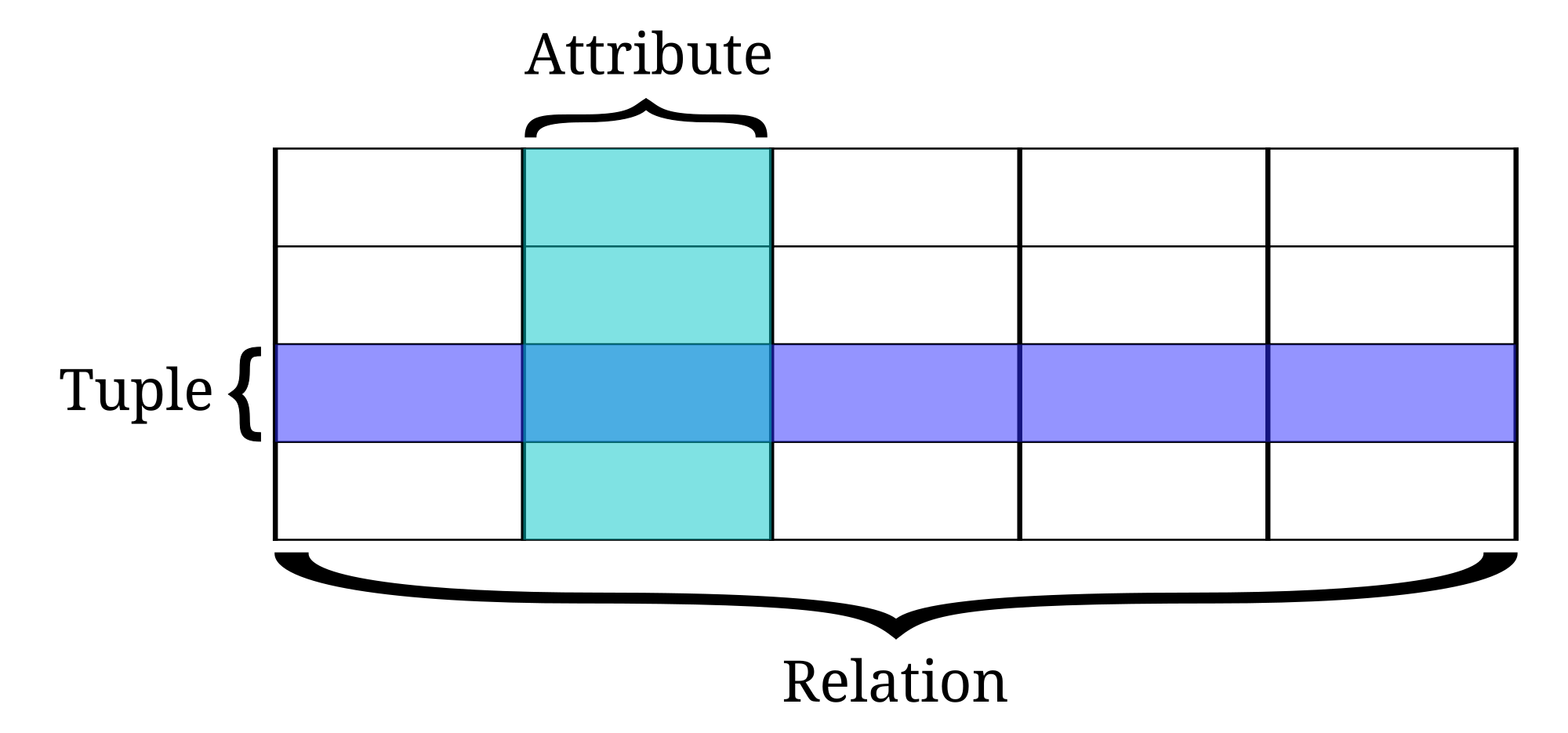
the data stored in the database is in the form of the tables which contains rows and columns. A row is a collection of columns and a table is a collection of rows. Rows are called as Tuples and columns are called as Attributes.


the basic syntax for creating the table is

Command: "create table table-name (attribute-1 attribute-type,attribute-2 attribute-type,........attribute-N attribute-type);"

Example : create table student_form
                 (
                 First_name varchar2(20),
                 Last_name varchar2(50),
                 Email varchar2(30),
                Password varchar2(20),
                Dob Date,
                Address varchar2(50)  
                 );

Note: SQL syntax is not case sensitive, only the data entered in the tables are case sensitive.

In order to know the description of the table, that is , column names and its types we use following commands.

Command : "desc table-name"

Explanation : here desc is a keyword. in place of desc we can also use describe. now i think the command is pretty clear of what it does. it describes the table

Example : desc student_form;

Note : here ";" is a delimiter. it is mandatory for the query's in SQL PLUS, but not in SQL Developer.


Thursday, 10 March 2016

Structure of PL/SQL blocks

Here we discuss about the basic structure of the PL/SQL block:

1. Declare
2. Begin
3. Exception
4. End

Declare:
used to define variable, constants,other PL/SQL approaches like cursors, triggers, records, collections,packages,functions,procedures, creating new Exceptions etc.

Begin:
used for writing the main logic that operate on the table data. this logic contains queries, calling the functions that are declared outside or creating the inline functions, loops, if statements,  etc..

Exceptions:
used for handling the errors.

End:
states that it is the end of the PL/SQL block.


declare


<declaration-section>
begin


<functional-section>
exception


<exception-section>
end;


PL/SQL

PL/SQL is used for "Thick Database Paradigm". let's go into deep understanding of the thick database paradigm. if an application is using oracle database and the data is not persisted, then the application is worthless. in order to persist the data, first the implementation details for persisting the data has to be hidden like tables and queries that operate on the data to persist. hiding such implementation details is said to be "Thick Database Paradigm"  approach.

Why it is thick?

Here is the answer , the PL/SQL blocks contains the queries as the code to operate on the data, these queries are written in the form of code such that the data can be changed and viewed  through the PL/SQL blocks. here the PL/SQL block acts as an interface(a medium or a bridge) and hiding the implementation details such has queries and tables. this is same as the approach used in programming. In programming there is a functionality hidden by a interface, only interface is exposed but not the actual implementation of functional details. here also same case, applying the OOPS concept such that the data is persisted, implementation details like tables and queries are hidden by PL/SQL where PL/SQL is acting like an interface. Here the SQL query fired from a PL/SQL block is treated as a special program.

On certain point of view it is possible to write applications only on the top of  SQL is possible that is without using PL/SQL. but using PL/SQL has a few advantages. some of them are listed below:
1. Integration with SQL
2. network traffic reduction.
3. increase in performance.
4. portability.

Conclusion: 
   PL/SQL combines the data manipulating power of SQL with the data processing power of procedural languages.